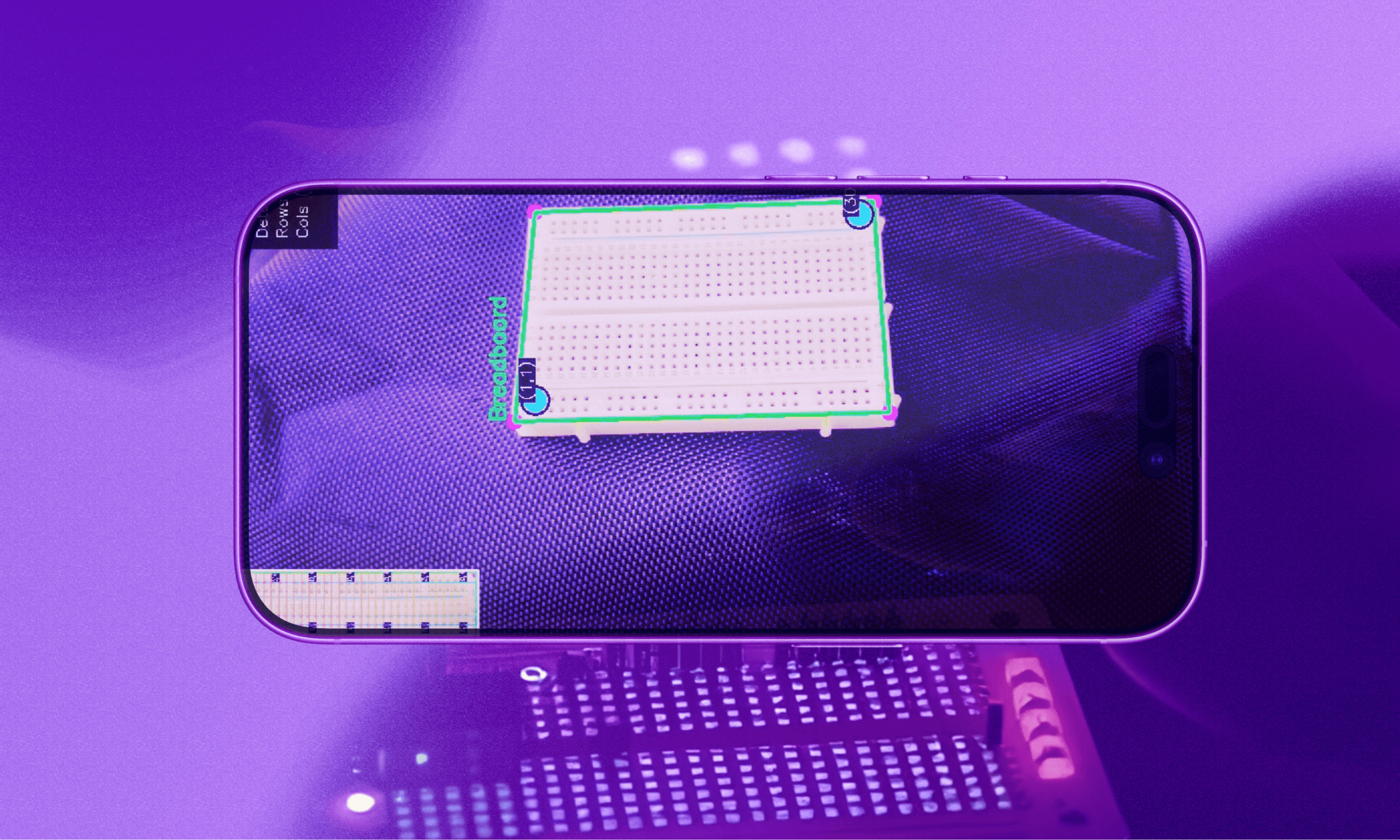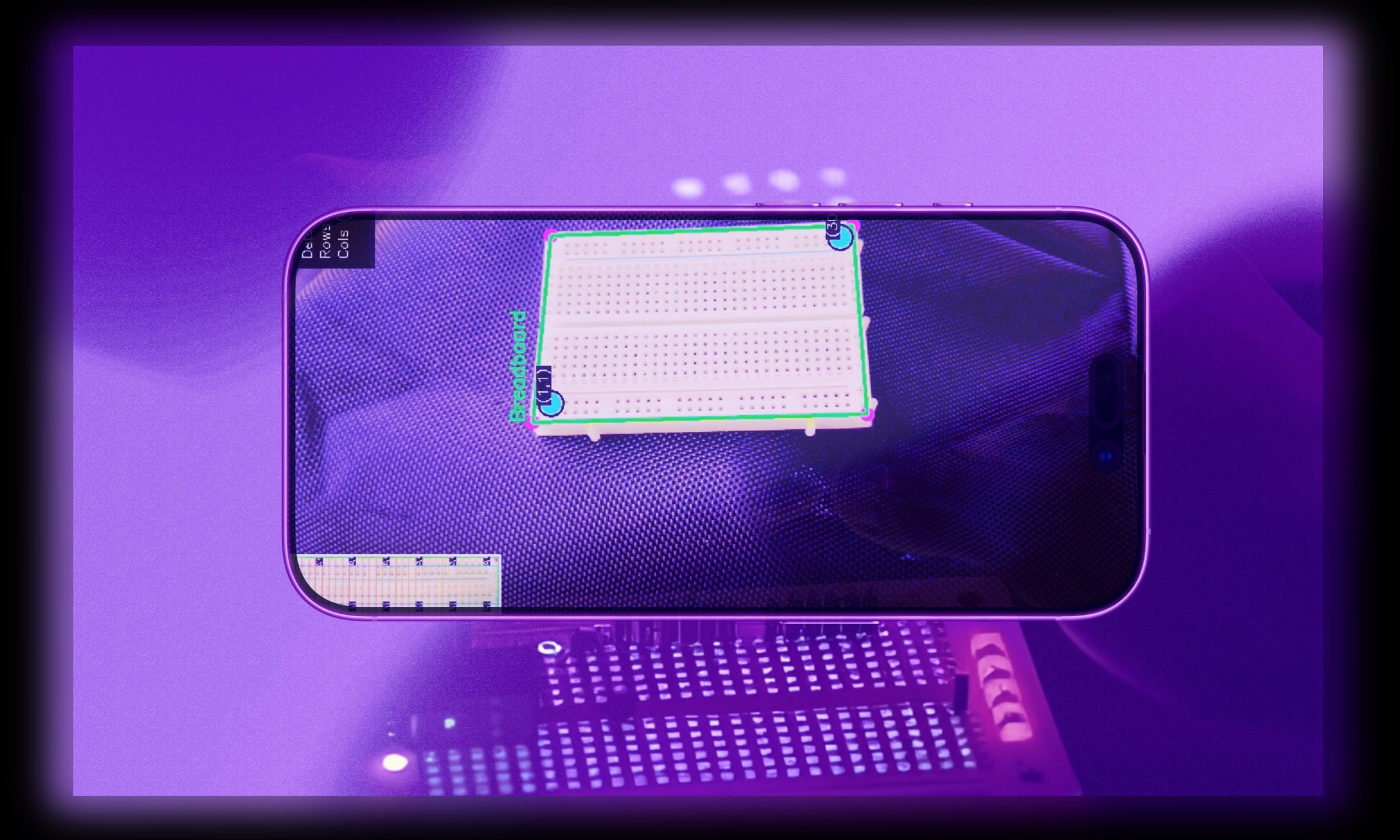
guideline is an augmented reality tool that visually guides users through the breadboarding process. it uses advanced algorithmic reasoning to accurately breadboard an electrical component list and layers intuitive instructions on screen.
guideline started from a simple question—what if the breadboard could show you exactly what to do, right on top of it?
in order to accomplish this, the team came up with a unique solution with 3 main factors:
vr headset
for the full experience of layering instructions on the physical breadboard, a phone based vr viewer was needed.
data pipeline
manually inputting a list of components would suck. so the team wanted a design where a raw electrical component list is uploaded via web app and then parsed into json & passed to our mobile app automatically.
advanced algorithms
the concept requires a computation heavy computer vision pipeline. guideline needs to detect the breadboard with opencv, apply some cool algorithms, and finally, display the vr instructions!
there are two main parts to guideline: the web app and the mobile app.
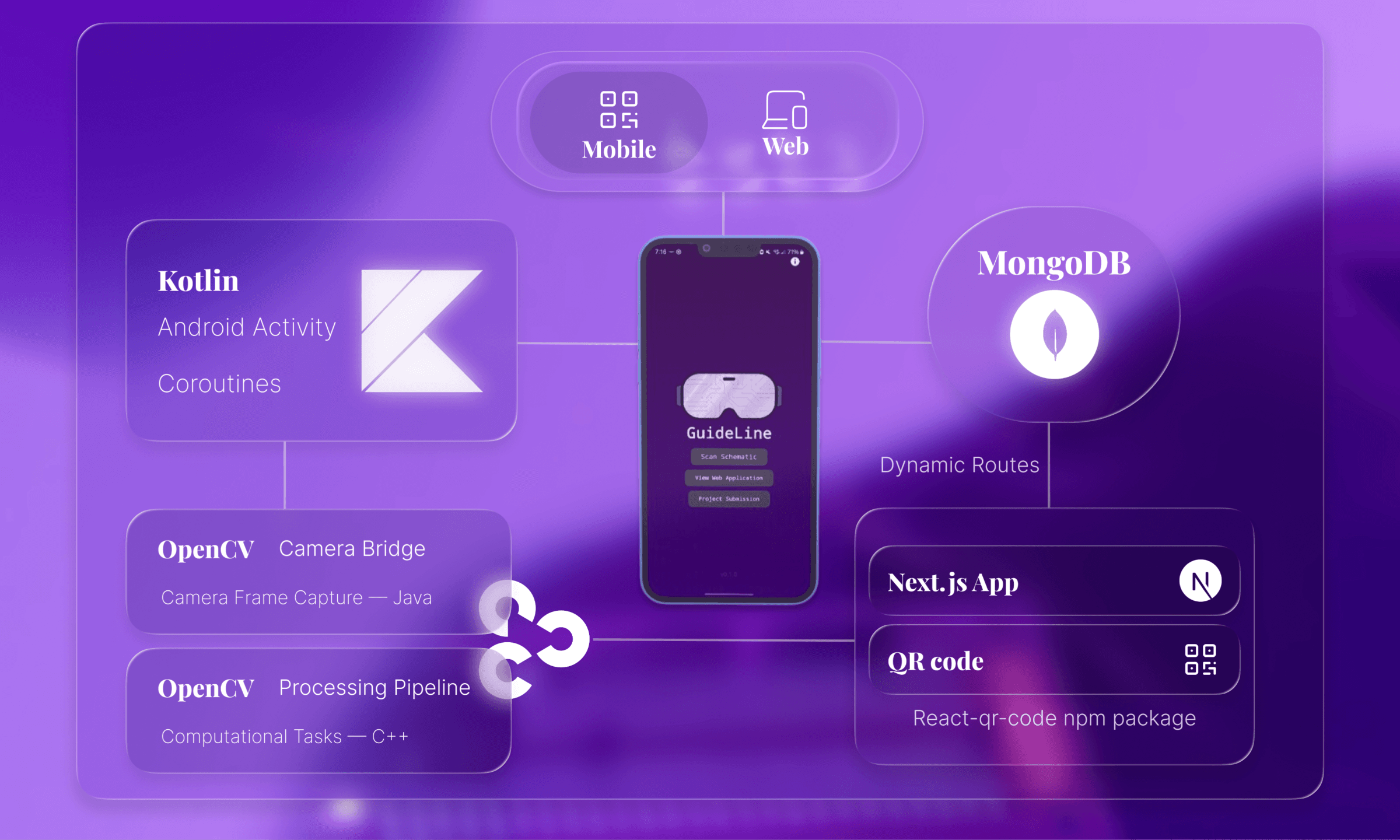
the web app accepts a component list upload, stores it in mongodb using dynamic routing, and generates a unique qr code that the mobile app can scan.
the mobile app scans the qr, downloads the parsed list, then runs a fast color-based segmentation to isolate the breadboard, estimate its corners, and flatten it to a top-down view.
histogram projections reveal the repeating hole grid so each cell can be mapped precisely. with that structure in place, the app overlays steps, components, and wiring onto each cell.
built with next.js and dynamic routes, the web app's functionality is simple:
take a component list, parse it, store it in a mongodb collection, and create a qr code using react-qr-code that points to the document id.
the route acts as a bridge between the qr code scan via the mobile app, and the user data.
it contains some generic next.js route handler code:
client/app/[slug]/route.tsexport async function GET(request: NextRequest, { params }) {
const { slug } = await params;
const client = await connectDB();
// minus error handling
const collection = client.db().collection("netlists");
const result = await collection.findOne({ _id: new ObjectId(slug) });
return NextResponse.json({ id: slug, data: Formatter(result.netlist) });
}
kotlin and opencv are heavily used in the mobile app.
qr code integrationfirst, guideline must fetch the data! this is done via the journeyapps barcode scanner. the data is stored inside an android intent.
server/app/src/ScanActivity.ktprivate val barcodeLauncher = registerForActivityResult(ScanContract()) { result ->
if (result.contents != null) {
val intent = Intent()
intent.putExtra("SCAN_RESULT", result.contents)
// ... hand the intent back to MainActivity
}
}
barcodeLauncher.launch(ScanOptions().setPrompt("Scan A QR Code"))
once the qr code is in possession, the circuit data must be fetched from our server. guideline's backend uses kotlin coroutines to handle this asynchronously without blocking the ui.
server/app/src/MainActivity.ktval coroutineScope = rememberCoroutineScope()
val scanLauncher = rememberLauncherForActivityResult(StartActivityForResult()) { result ->
if (result.resultCode == Activity.RESULT_OK) {
val scanContent = result.data?.getStringExtra("SCAN_RESULT")
coroutineScope.launch { linkReader(scanContent, context) }
}
}
rememberCoroutineScope() creates a coroutine scope that's tied to the composable's lifecycle - it automatically cancels when the composable leaves the screen.
coroutineScope.launch kicks off the network request without blocking the ui thread.
fetching circuit datathe linkReader() function shows kotlin coroutines in action - properly managing threads for network operations and ui updates.
server/app/src/MainActivity.ktwithContext(Dispatchers.IO) {
urlConnection = url.openConnection() as HttpURLConnection
val response = BufferedReader(InputStreamReader(urlConnection.inputStream)).readText()
withContext(Dispatchers.Main) {
val arPage = Intent(context, ARActivityOne::class.java)
arPage.putExtra("jsonData", response)
context.startActivity(arPage)
}
}
withContext(Dispatchers.IO) moves the network call off the main thread.
Dispatchers.Main switches back to the ui thread to open the ar screen, since ui work can only happen there.
augmented reality!this is where it gets fun and processing intensive, andy did most of the heavy lifting on 1 hour of sleep.
 there are around 2k lines of logic in AR.kt and it's more complex than what i'm going to describe but i'll keep it simple. 1 | detecting the breadboard in frame
the first challenge: finding a white breadboard in frame and getting a normalized top-down view.
server/app/src/AR.kt// HSV thresholding to isolate white breadboard
val lowerWhite = Scalar(0.0, 0.0, 200.0)
val upperWhite = Scalar(180.0, 50.0, 255.0)
val mask = Mat()
Core.inRange(hsv, lowerWhite, upperWhite, mask)
// ... morphological cleanup, then Imgproc.findContours(mask, contours, ...)
// Largest contour is assumed to be the breadboard
val maxContour = contours.maxByOrNull { Imgproc.contourArea(it) }
guideline thresholds for white objects with opencv (low saturation, high value in hsv), then finds the biggest blob. morphological operations clean up the noise before contour detection.
2 | perspective transform logiconce the four corners are obtained, the breadboard is warped into a flat rectangle. this makes grid detection consistent regardless of camera angle.
server/app/src/AR.kt// srcMat: the 4 sorted corners, dstMat: corners of a flat rectangle
val transformMatrix = Imgproc.getPerspectiveTransform(srcMat, dstMat)
// Store inverse for mapping points back to original view
inverseTransformMatrix = Imgproc.getPerspectiveTransform(dstMat, srcMat)
Imgproc.warpPerspective(source, warped, transformMatrix, normalizedSize)
problem: grid points are detected in the warped rectangle, but highlights need to be drawn in the original camera frame.
our solution was using the inverse perspective transform, which maps coordinates back using homogeneous coordinates.
3 | grid detection with histogram analysisnext, guideline finds where the holes exist on the breadboard, which are the intersection of rows and cols. histogram projection counts white pixels in each row and column, smooths the signal with gaussian filtering, and finds peaks (the grid lines).
server/app/src/AR.kt// ... adaptive threshold the warped image into binary
// Count white pixels per row/column
for (y in 0 until binary.height()) {
for (x in 0 until binary.width()) {
if (binary.get(y, x)[0] > 0) {
horizontalProjection[y]++
verticalProjection[x]++
}
}
}
// Smooth and detect peaks (same for vertical)
val smoothedHorizontal = smoothArray(horizontalProjection)
val horizontalPeaks = detectPeaks(smoothedHorizontal, binary.height())
// ... each peak becomes a grid line (horizontalLines, verticalLines)
now every grid intersection is computed and stored in a 2d array. this becomes our "map" of the breadboard.
server/app/src/AR.ktval matrix = Array(horizontalLines.size) { row ->
Array<Point?>(verticalLines.size) { col ->
findIntersection(horizontalLines[row], verticalLines[col])
}
}
now matrix[5][12] gives us the exact pixel coordinates of row 5, column 12.
5 | sequential pin highlightingthis is where the magic happens. the app cycles through components and their pins automatically.
server/app/src/AR.kt// Runs every frame, advances once per PIN_HIGHLIGHT_DELAY_MS
val now = System.currentTimeMillis()
if (now - lastUpdateTime >= PIN_HIGHLIGHT_DELAY_MS) {
clearHighlightedPoints()
val component = placements[currentComponentIndex]
if (currentPinIndex < component.positions.size) {
val (row, col) = component.positions[currentPinIndex]
highlightGridPoint(row, col)
// ... show "${component.ref} - Pin N" on screen
currentPinIndex++
} else {
// Move to next component
currentComponentIndex = (currentComponentIndex + 1) % placements.size
currentPinIndex = 0
}
lastUpdateTime = now
}
this implements a state machine that walks through each component's pins.
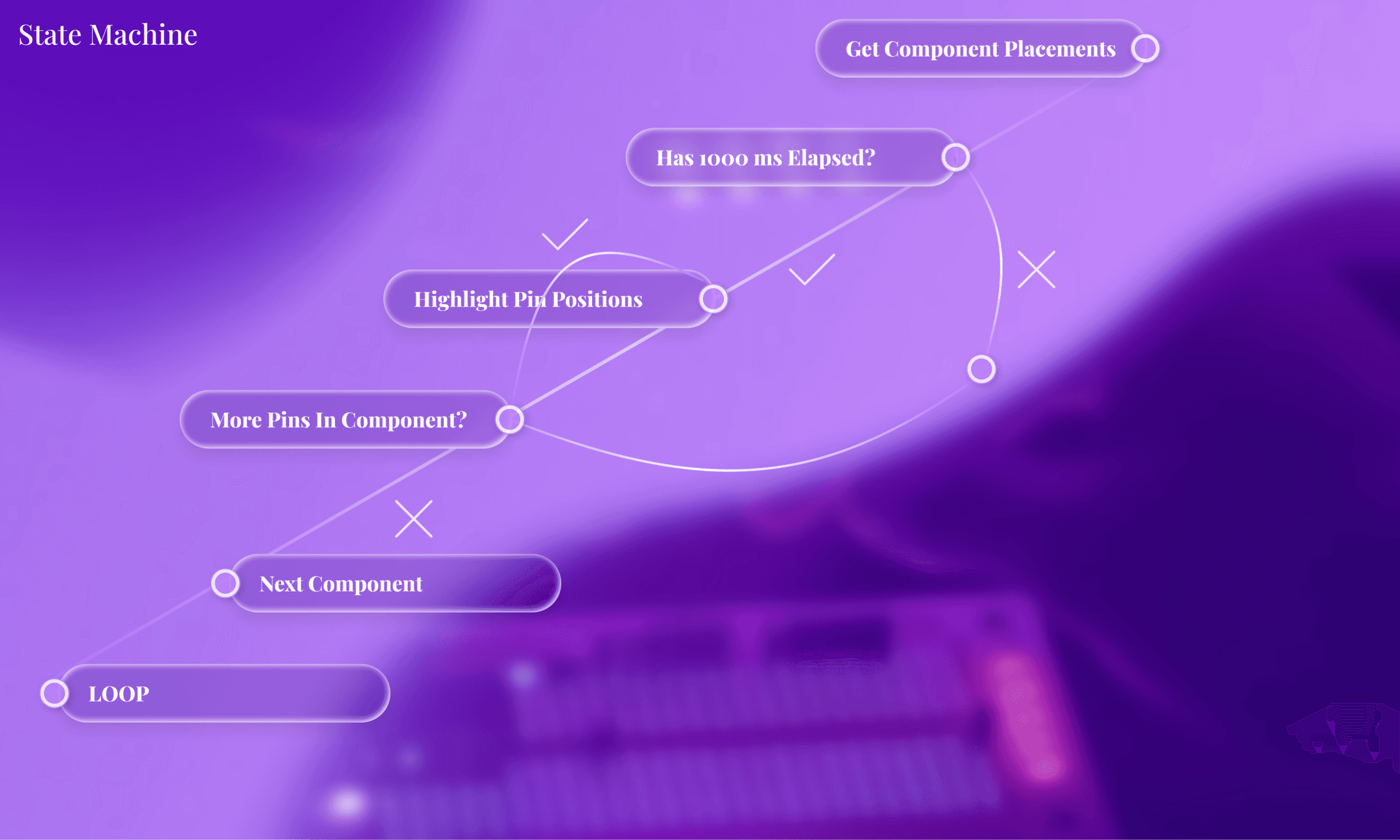
when it finishes one component, it moves to the next. when it finishes all components, it loops back. timing is controlled by checking System.currentTimeMillis() for frame-independent delays.
6 | mapping highlights back to camera vieweverything is detected in the warped view, but users see the camera feed. so each highlight point must be transformed back using the inverse matrix.
server/app/src/AR.kthighlightedPoints.forEach { (row, col) ->
matrix[row][col]?.let {
// Map from warped to original view
val originalPoint = mapPointFromWarpedToOriginal(it)
Imgproc.circle(rgba, originalPoint, 8, CYAN, -1)
Imgproc.putText(rgba, "($row,$col)", originalPoint, FONT, 0.5, WHITE, 1)
}
}
the result: bright dots with coordinates that follow the breadboard as you move it around.
the team created a functional prototype within 36 hours and won second at jamhacks x.
there was real potential to ship guideline. however, this was during may of high school senior year so everyone was in full senioritis mode. nevertheless, this was one of my coolest builds yet!
here's a short clip to prove that it was functional: