phuture is a nature exploration app with 30 alpha testers lined up for early-stage testing. inspired by the pokédex in pokémon and the mechanics of pokémon-go, the underlying concept of phuture revolves around collecting every single plant & animal species in the world into a personal database.
12am: i was riding my bike through the forest when it hit me: what if every species of wildlife was able to be collected?

it got me pondering and i genuinely almost crashed into a tree. being out in nature is underrated, but addiction to technology made people forget about what's out there.
the intersection of ai and nature seemed interesting, so i called andy up and began brainstorming the concept.
unity was the most logical choice for the mobile app as phuture needed mapping functionality. there were plenty of cool mapping sdks to choose from. all the game logic lives in the containerized node.js server, hosted on aws.
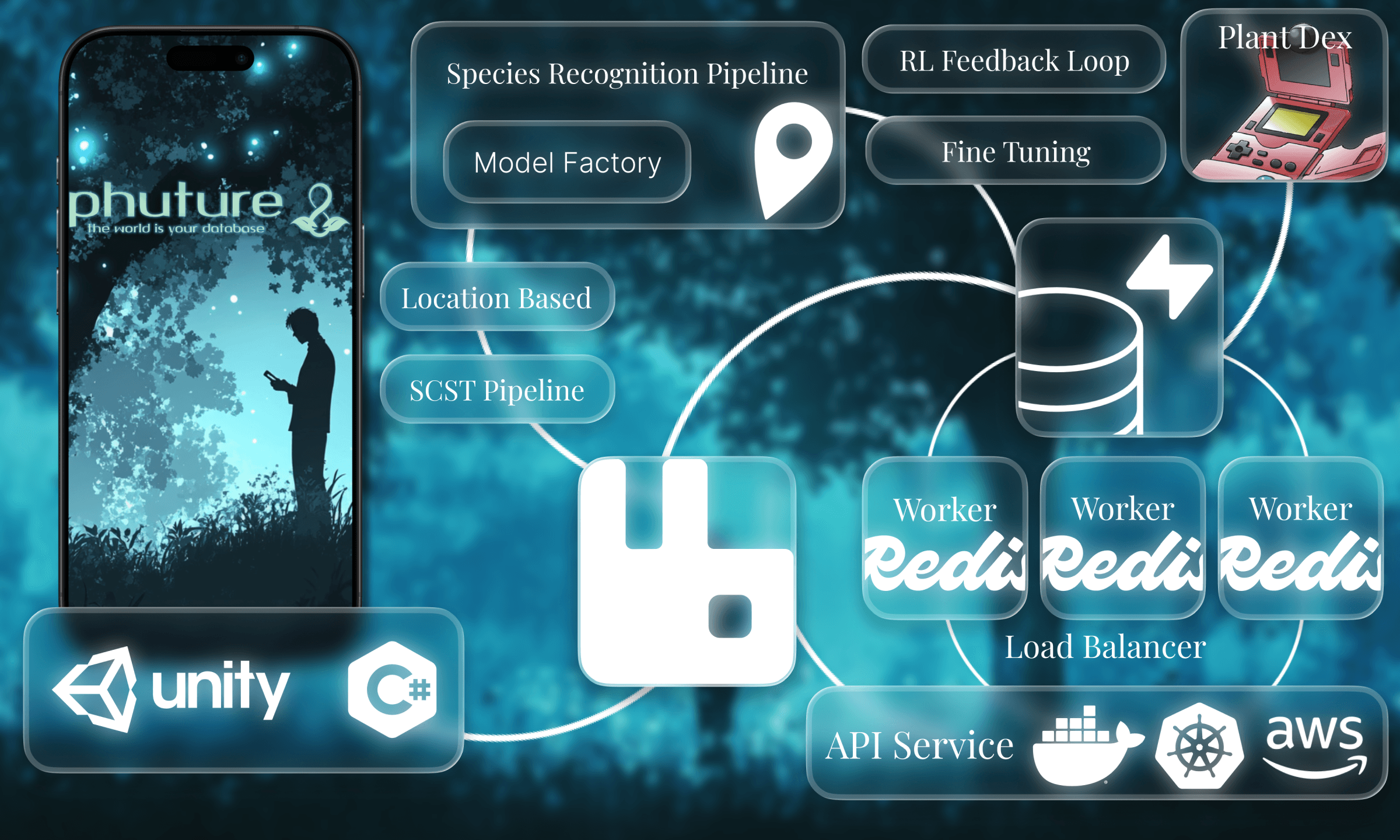
essentially, the user would take a picture of a species using the in-app camera, and the correct species would (somehow) be figured out under the hood in a reasonable amount of time.
phuture initially was designed to include a complex machine learning system with feedback loops to accurately identify wildlife species using a single image and location-based context.
the idea was to build regional models through a model factory pipeline so individual models wouldn’t grow too large or complex. for example, western canada, eastern canada, and arctic canada would each have separate models.
the correct model would then be automatically downloaded to the user’s phone based on their current location.
however, once data cleaning proved far more intensive than expected (so many species!), it was decided to pivot to direct llm calls in the meantime, sacrificing accuracy for simplicity.
i spent most of the summer trial and erroring the server. this was my first time using docker, redis, and rabbitmq so it was a perfect learning experience for me.
the routes are separated with express router:
src/routes/openai.ts wildlife identification with ai
src/routes/places.ts actions with location data
src/routes/scripts.ts detecting % blur in an image and others
src/routes/session.ts auth logic and redis sessions
src/routes/userdata.ts userdata logic and rabbit queues
redisi used redis as a low-latency cache and session store to avoid repeated database calls and to keep auth stateless.
user data is cached in redis hashes with a short ttl, while auth sessions are stored as token → user mappings.
server/lib/redis/caching.tsawait redis.hset(`userdata:${user.id}`, {
username: user.username,
currency: user.currency,
inventory_plants: JSON.stringify(user.inventory_plants),
inventory_animals: JSON.stringify(user.inventory_animals),
location: JSON.stringify(user.location),
});
await redis.expire(`userdata:${user.id}`, 60 * 5); // 5 min cache
this allows the backend to serve frequent reads from memory instead of postgres, reducing latency and load.
sessions are stored separately using expiring keys, so logging out is as simple as deleting a redis entry.
rabbitmqi used rabbit as the event backbone for the backend. instead of performing database writes directly in the main request lifecycle, events are published to queues and processed asynchronously by subscribers.
this makes gameplay responsive and allows heavy background tasks to be offloaded without slowing the app down.
server/lib/rabbitmq/rabbitmq.ts// publish game event to queue
await channel.assertQueue("game_events", { durable: true });
channel.sendToQueue("game_events", Buffer.from(JSON.stringify({
sessionToken,
eventType: "level_up",
data: { newLevel: 5 }
})), { persistent: true });
events cover gameplay actions, collection updates, social interactions, location tracking, chat messages, and analytics. subscribers consume the queues, validate sessions using redis, and then update postgres or perform other side effects.
server/lib/rabbitmq/subscribers.tschannel.consume("game_events", async (msg) => {
if (!msg) return;
const { sessionToken, eventType, data } = JSON.parse(msg.content.toString());
// fetch userId from redis session
const payload = await redis.get(`session:${sessionToken}`);
if (!payload) {
console.error("No session found for token", sessionToken);
return channel.ack(msg);
}
const { userId } = JSON.parse(payload);
// call the appropriate handler
const handler = gameEventHandlers[eventType];
if (handler) await handler(userId, eventType, data);
channel.ack(msg);
});this setup is scalable, as events are handled in parallel and logic layers are separated to reduce coupling.
exchanges are also used to route events to multiple queues. for example, a collection event can be sent to both the game logic queue and an analytics queue simultaneously:
server/lib/rabbitmq/rabbitmq.tschannel.publish("game_exchange", "collection_events", Buffer.from(JSON.stringify({
sessionToken,
column: "inventory_animals",
body: { new: "lion" }
})), { persistent: true });
this architecture ensures that gameplay events, analytics, and background jobs can scale independently, which makes the whole backend easier to navigate and debug.
notificationsnotifications were not just a frontend toast system. i wanted them to work both live and durably, so i pushed delivery into the async pipeline instead of writing directly in the request lifecycle.
the api accepts the command first, resolves the current session, and publishes a notification_events job to rabbitmq. that keeps the request fast while still handing the actual delivery work to the worker layer.
src/routes/notifications.tsrouter.post("/send", async (req, res) => {
const { userId } = await getSessionPayload(req.body.sessionToken);
await publishToQueue("notification_events", {
userId,
title: req.body.title,
body: req.body.body,
priority: req.body.priority,
persist: req.body.persist,
sourceQueue: "notification_events",
});
res.json({ success: true, queued: true });
});once the worker consumes that job, redis gets used in two separate patterns: a capped inbox list for persistent history, and pub/sub channels for instant delivery to connected clients.
src/lib/notifications/notificationBus.tsexport async function deliverNotification(redis, command) {
const notification = buildNotification(command);
if (command.persist !== false) {
await redis
.multi()
.lpush(`notifications:inbox:${command.userId}`, JSON.stringify(notification))
.ltrim(`notifications:inbox:${command.userId}`, 0, 99)
.expire(`notifications:inbox:${command.userId}`, 30 * 24 * 60 * 60)
.exec();
}
await redis.publish(`notifications:user:${command.userId}`, JSON.stringify(notification));
}that split let me support live-only events and durable inbox notifications with the same backend primitive. if a user is online, they see it instantly; if they reconnect later, the inbox still has the event.
i also added an internal sse pipeline stream for the dashboard so i could see the exact queue, handler, status, and worker container that processed each command. this made the difference between api accepted and worker processed visible in real time, which made the rabbitmq architecture feel tangible instead of theoretical.
src/lib/sse/eventBus.tsemitSSE(
"notification_events",
"game_exchange",
notification.category,
payload.userId,
`Delivered notification ${notification.id} to ${payload.userId}`,
"success"
);from the outside it looks like a simple push notification. under the hood it is api -> rabbitmq -> worker -> redis inbox/pubsub -> sse client delivery, which ended up being one of the more technically satisfying parts of the backend.
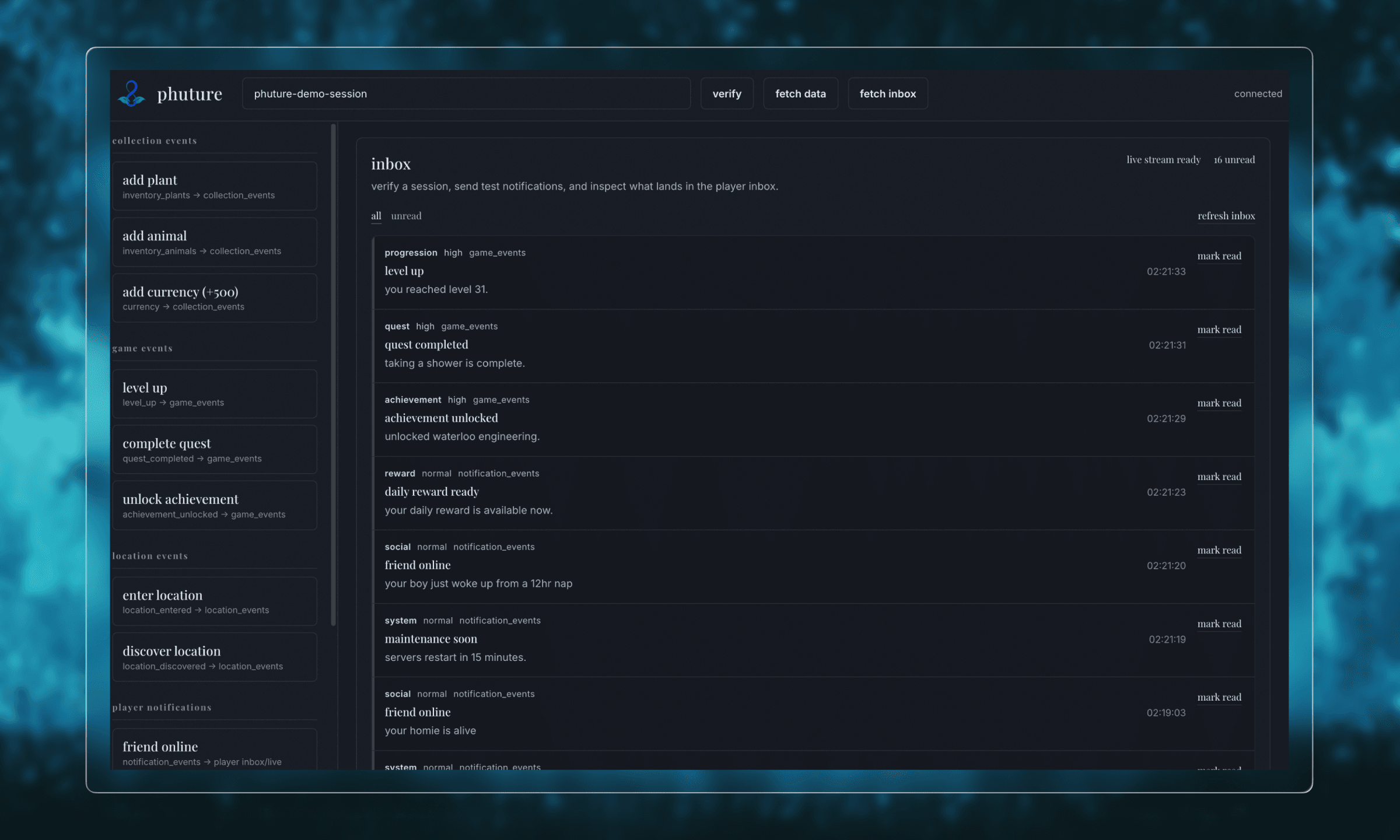
i used a plain html dashboard to test the notification system. interesting to see how http responses fire much faster than the actual action handled by rabbit!
security scriptsi used bash scripts to set up secure configurations for redis, rabbitmq, and the application environment. one of the main use cases was setting strong secret variables.
/setup-security.sh#!/bin/bash
# generate secure passwords
REDIS_PASSWORD=$(openssl rand -base64 32)
RABBITMQ_PASS=$(openssl rand -base64 24)
SESSION_SECRET=$(openssl rand -base64 64)
# create .env with strong secrets
cat > .env << EOF
REDIS_PASSWORD=${REDIS_PASSWORD}
RABBITMQ_PASS=${RABBITMQ_PASS}
SESSION_SECRET=${SESSION_SECRET}
EOF
# secure Redis and RabbitMQ configs
chmod 600 .env
the whole script automatically generates environment secrets, sets restrictive permissions, and creates monitoring tables for logging security events in supabase.
docker + kubernetes architecturethe backend uses docker for containerization and kubernetes for orchestration. each service, the server, redis, and rabbitmq, runs isolated in its own container.
dockerfileFROM node:22.14.0-alpine AS prod
ENV NODE_ENV=production
COPY package.json package-lock.json ./
RUN npm ci --omit=dev
COPY --from=builder /app/dist ./dist
USER nodejs
EXPOSE 4000
CMD ["node", "dist/index.js"]i used multi-stage builds: a base stage for setup and permissions, a builder stage to install dependencies and build, and dev/prod stages to optimize image size and security.
docker-compose.yamlserver:
build:
context: .
target: dev
environment:
NODE_ENV: development
REDIS_URL: redis://default:${REDIS_PASSWORD}@redis:6379
RABBITMQ_URL: amqp://${RABBITMQ_USER}:${RABBITMQ_PASS}@rabbitmq:5672
ports:
- "127.0.0.1:8080:4000"
user: "1000:1000"
networks:
- game_network
redis:
image: redis:7-alpine
volumes:
- ./redis/redis.conf:/usr/local/etc/redis/redis.conf
ports:
- "127.0.0.1:6379:6379"each service communicates over an isolated bridge network. redis and rabbitmq have healthchecks and resource limits to prevent overuse. ports are bound to localhost during development, and volumes persist data and configs.
i followed a microservice design for the server; it doesn't embed services. rather, it connects to them over the network. this allows the server to scale independently!
 kubernetes.yaml
apiVersion: apps/v1
kind: Deployment
metadata:
name: phuture-backend
spec:
replicas: 1
selector:
matchLabels:
todo: web
template:
metadata:
labels:
todo: web
spec:
containers:
- name: backend
image: phutureai/phuture-backend
---
apiVersion: v1
kind: Service
metadata:
name: backend-entrypoint
spec:
type: NodePort
selector:
todo: web
ports:
- port: 4000
targetPort: 4000
nodePort: 30001kubernetes enforces self-healing, so when pods crash, they are automatically recreated. the service exposes the backend via nodeports, supporting horizontal scaling and integration with ingress.
the overall design separates concerns:
server handles api requests and cron jobs,
redis handles caching and sessions,
and rabbitmq handles async events,
more on kubernetes networking and scaling can be found here.
andy worked on the unity app so i'll cover only the surface:
mapping was done with arcgis, login flow was standard supabase implementation.
 user permissions camera
phuture needs camera access for the user to take pictures of wildlife.
locationphuture requires user location for many in-app features.
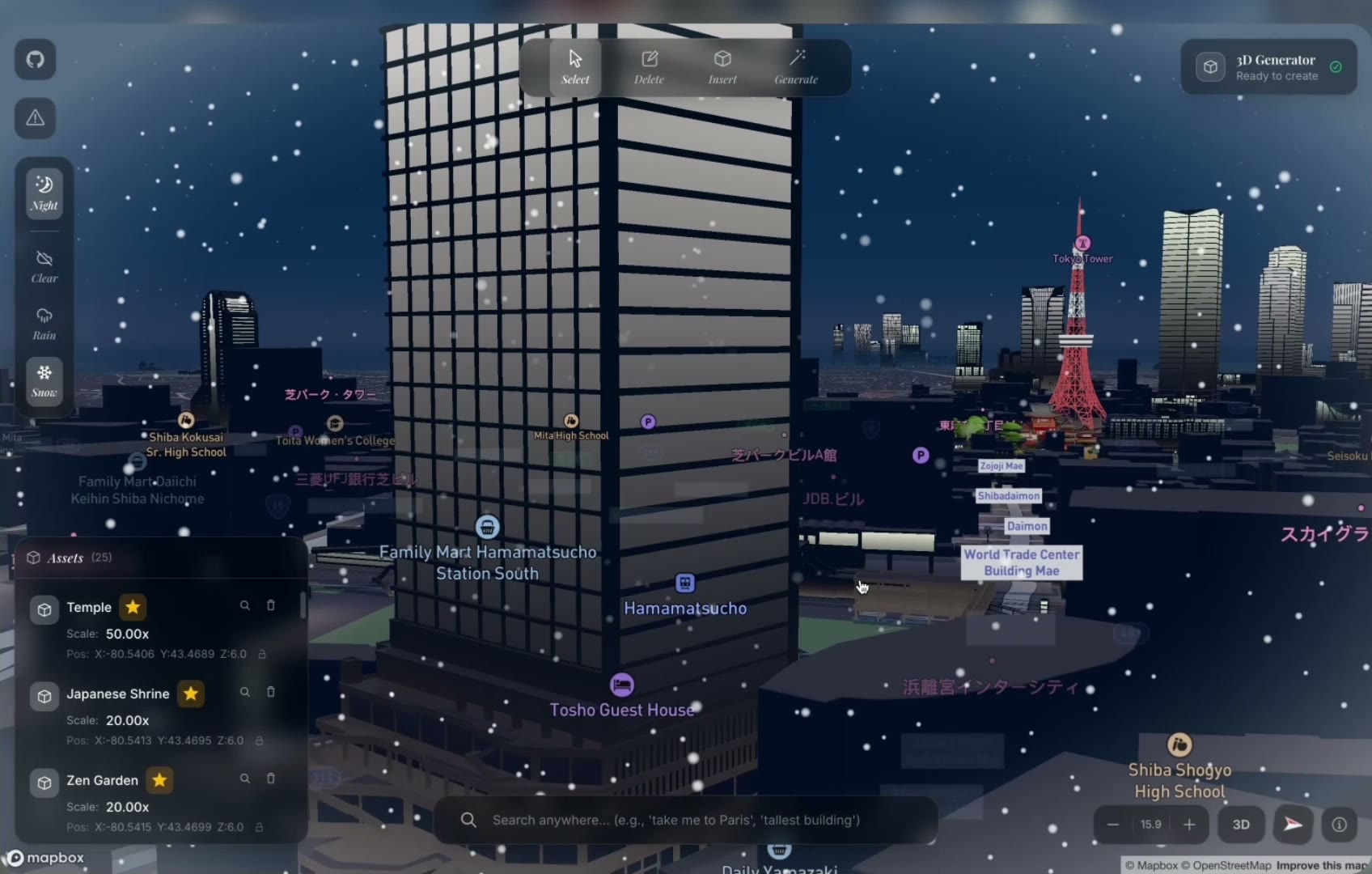
here is a quick demo with raw mapping implemented. the goal was to have an avatar accurate to true location, similar to pokémon-go.
andy and i shot the launch video, with some help from gary, and it reached ~20k impressions on linkedin! this isn't a big number by any account, but it was my first time gaining traction on something that i was building.
 watch the full launch with volume on my linkedin
andy and i stopped working on phuture when we began uwaterloo.
life got in the way but i have zero regrets. the concept was worth pursuing, i learned a ton about server infrastructure. i also received positive reception on social media (30 alpha tester signups!), so the work put in was still valuable.